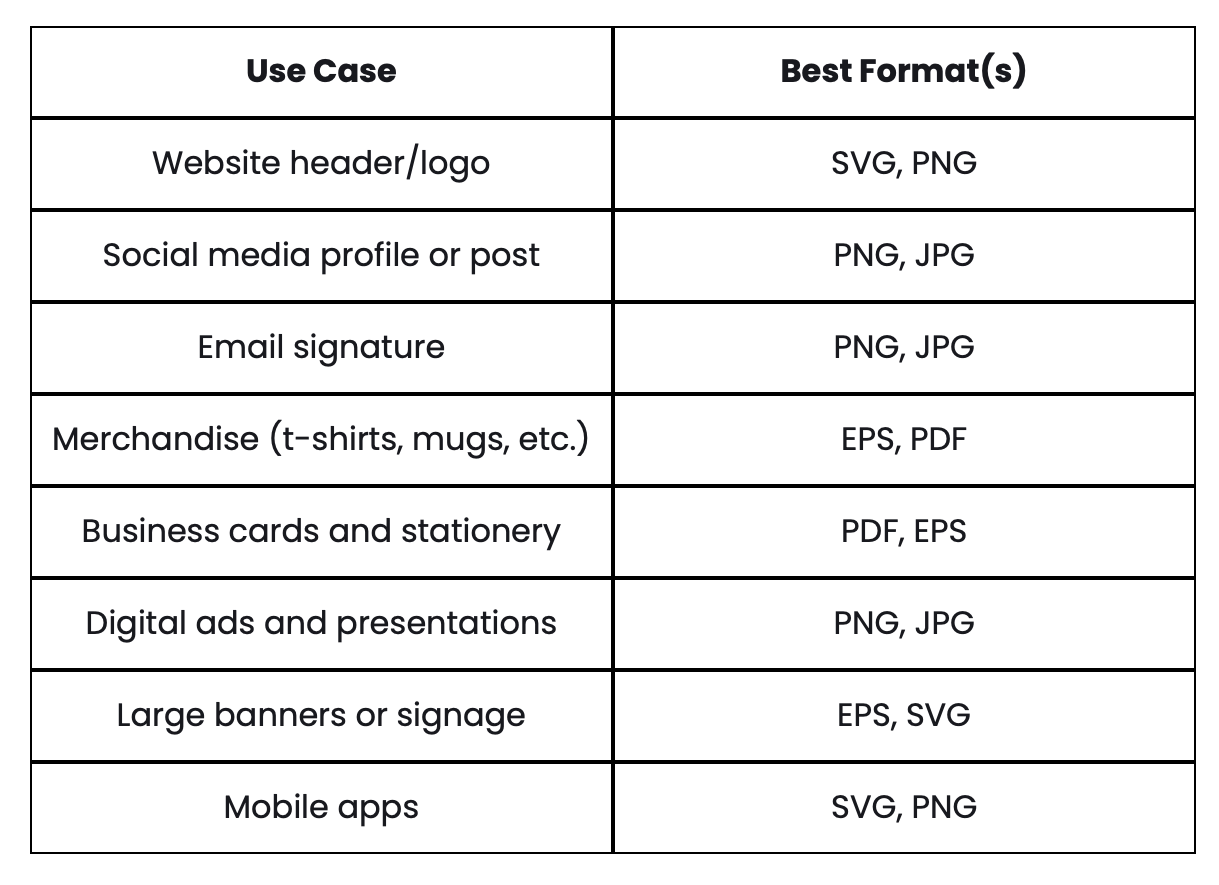
Which file type for this project?
To keep your designs looking sharp, polished, and professional everywhere they appear, designers typically work with a combination of vector (mathematical path-based) and raster (pixel-based) files.
Each format serves a specific purpose — and having the right mix ensures your brand performs beautifully in both digital and print environments.
1. Core Brand Assets (The Must-Haves)
These are your foundational files — the master assets used to create everything else.
AI (Adobe Illustrator)
The industry-standard master file for logos and illustrations. Fully editable and infinitely scalable without losing quality.
EPS (Encapsulated PostScript)
A universal vector format often requested by professional printers, especially for large-scale applications like signage, vehicle wraps, or billboards.
PDF (Portable Document Format)
Highly versatile for both print and digital. A high-resolution PDF preserves fonts, layout, and vector quality while remaining widely accessible.
2. Files for Your Website & Digital Ads
Digital platforms require screen-optimized files in RGB color mode that load quickly and display clearly across devices.
SVG (Scalable Vector Graphics)
The gold standard for web logos and icons. They scale perfectly at any size and keep file sizes small.
PNG (Portable Network Graphics)
Best for graphics that need a transparent background — perfect for logos, overlays, and layered website elements.
JPEG / JPG
Ideal for photographs and detailed images where smaller file size matters.
WebP
A next-generation format offering superior compression compared to JPEG and PNG, helping websites load faster without sacrificing quality.
GIF
Used for simple animations or lightweight moving graphics.
3. Files for Packaging & Print
Physical materials require high-resolution files (typically 300+ DPI) in CMYK color mode for accurate printing.
Press-Ready PDF
The most common final file printers request. Includes bleeds, crop marks, and correct color settings.
TIFF (Tagged Image File Format)
Used for extremely high-quality photographic printing — such as large posters or premium packaging.
Dielines
For packaging projects, the original flat template showing fold lines and cut lines must remain unaltered to ensure proper production.
Fonts
Always provide original font files when possible — or ensure text is converted to outlines in vector files to prevent font substitution errors.
Having the correct file types isn’t just a technical detail — it protects your brand’s integrity. When your assets are properly prepared, your logo stays crisp, your colors stay accurate, and your brand looks consistent everywhere it appears.